Hybrid cloud infrastructure
Kloudcover ECS Anywhere Mesh
AWS, connected to where you run.
Connect AWS to containers on your own hardware. Host-based routing and health-aware proxying connect your local services to your AWS environment.

Hybrid cloud infrastructure
AWS, connected to where you run.
Connect AWS to containers on your own hardware. Host-based routing and health-aware proxying connect your local services to your AWS environment.
Architecture
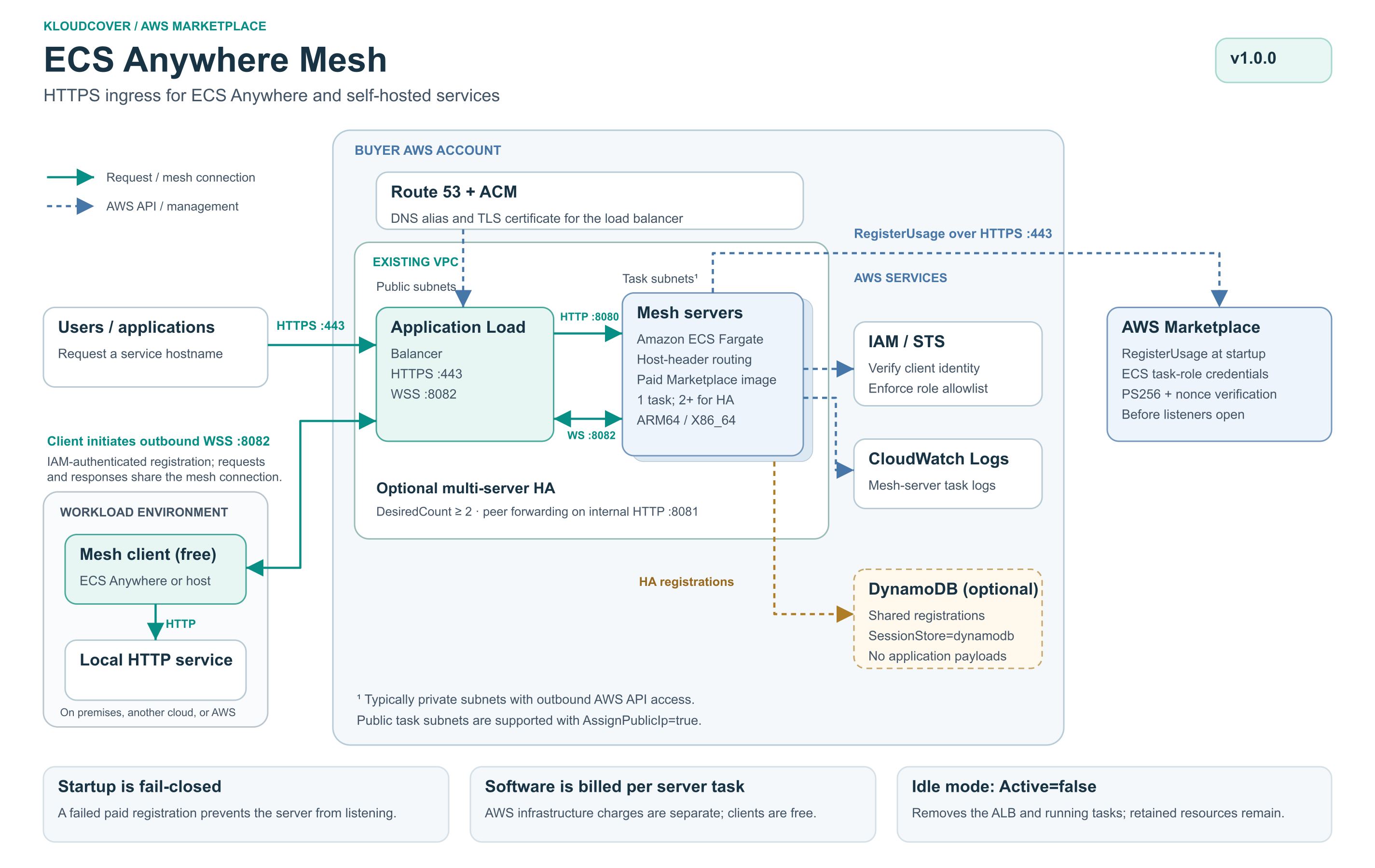
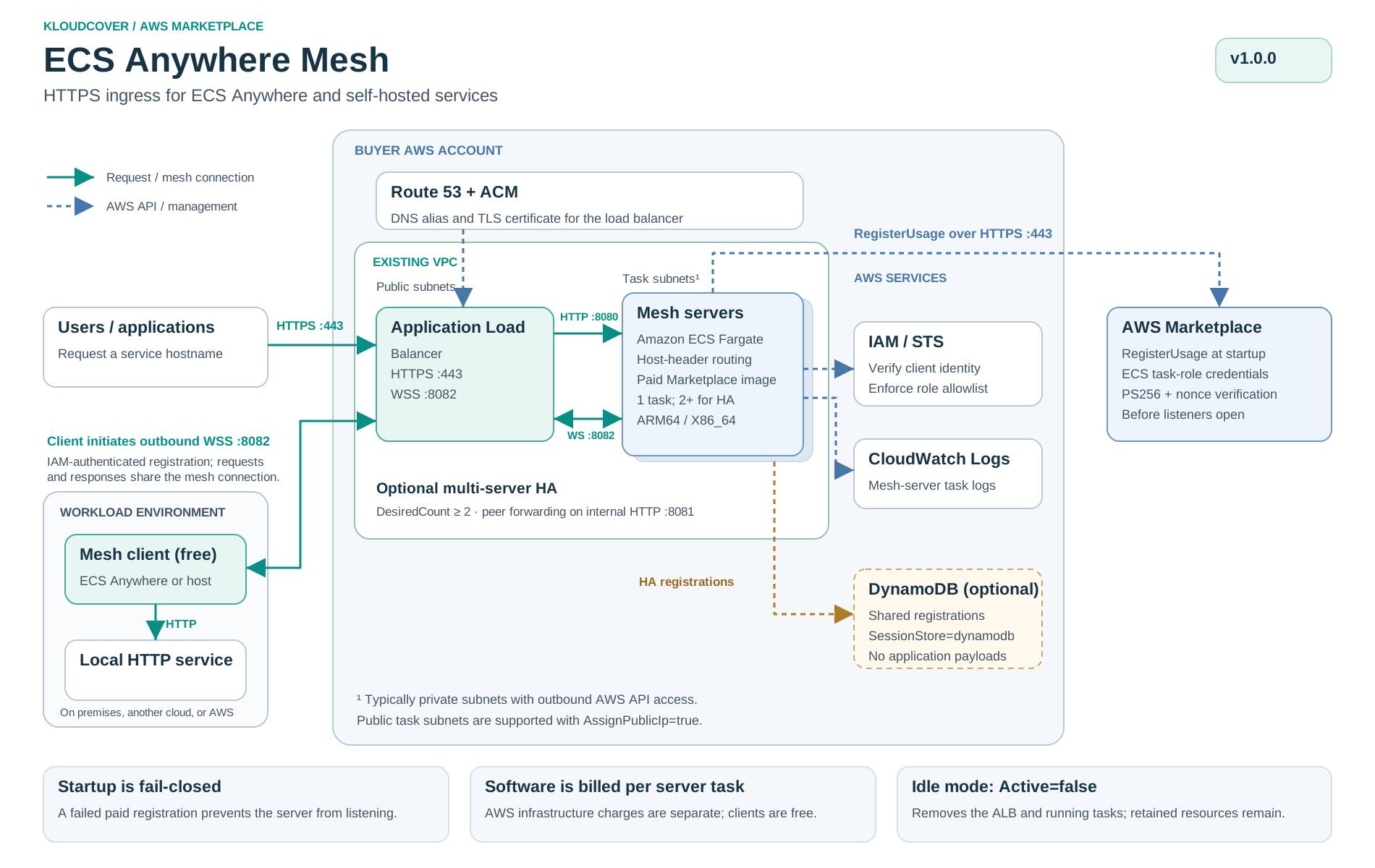
Optional high availability: use SessionStore=dynamodb with DesiredCount=2 or more for shared registrations and peer forwarding. A single mesh server does not require DynamoDB.
Subscribe through AWS Marketplace, then follow the deployment guide below.
Capabilities
Deploy an ingress in AWS, then send a request to a test app on your own ECS Anywhere host. The two stacks below serve different purposes: the paid ingress runs on Fargate; the included client and test app run on your existing external instance.
Use version 1.0.2 in AWS Marketplace and the matching downloads below. All required images, including the client and example app, are delivered through your Marketplace subscription. Only mesh-server tasks incur software usage charges.
These downloads are pinned to the same release. A new release updates this guide; existing stacks do not upgrade automatically.
Subscribe to Kloudcover ECS Anywhere Mesh. You need permission to create CloudFormation stacks and IAM roles, plus an existing VPC, two public subnets in different Availability Zones, task subnets, and a public Route 53 zone you control.
Your existing Linux ECS Anywhere cluster must have a connected external instance with at least 256 CPU units and 384 MiB of available task memory. Deploy the test-app stack in that cluster’s account and Region. The host needs working task IAM credentials, the awslogs driver, Marketplace ECR image pulls, and outbound access to AWS ECS, STS, CloudWatch Logs, and the ingress on TCP 8082. No inbound host ports are needed.
Example DNS values below use a zone named example.com, an ingress domain mesh.example.com, and a test hostname test.mesh.example.com. Replace them with your own values. Use a dedicated DNS prefix to avoid replacing an existing wildcard record.
The extra mesh label is optional. This walkthrough uses test.mesh.example.com to keep its DNS records separate from your existing apps. To use test.example.com, set ZoneName=example.com, DomainName=example.com, and AlbAliasRecordName=*. Check for existing wildcard records before creating one.
The connection address and app hostname are separate. IngressEndpoint is where the client opens its WebSocket connection; RoutingHost is the hostname visitors request. Multiple clients can connect to wss://connect.example.com:8082 while registering different app names. With DomainName=example.com, that connection name matches the current template’s *.example.com WebSocket listener rule and wildcard certificate.
Root domains and multiple domains are supported by mesh routing. You can route example.com to one app and anotherdomain.com to another through the same ingress. Each client registers its own exact hostname. Each app domain needs a DNS alias pointing to the ALB and certificate coverage on the HTTPS listener. A wildcard certificate does not cover the root domain itself.
The current template does not automate that full setup. It creates one wildcard DNS record and a certificate for DomainName plus *.DomainName, or accepts an existing certificate through CertificateArn. Root-domain aliases, additional domains, and any additional listener certificates need separate DNS/certificate configuration. Keep a working client connection hostname under *.DomainName; it does not need to equal the app domain. Merely changing RoutingHost does not create DNS or certificate coverage.
AllowedRoleArns accepts wildcard patterns, not only full role names. Choose the scope that fits your company; replace 123456789012 with the account that owns the client task roles.
arn:aws:sts::123456789012:assumed-role/*arn:aws:sts::123456789012:assumed-role/mesh-client-*/*arn:aws:sts::123456789012:assumed-role/MyClientRole/*, or the test stack’s exact ClientRolePattern output.To trust multiple accounts, provide one account-scoped pattern per account, separated by commas. The final wildcard includes the task’s changing session ID. These patterns match the STS identity, not an arn:aws:iam::…:role/… ARN. The client still needs valid AWS credentials and ecs:DescribeClusters on its configured cluster.
Account-wide access skips the role-copying step. If your chosen pattern already covers the test role, use it when deploying the ingress; no allowlist update is needed for each new role in that account. You can deploy the ingress before the test-app stack. The numbered example below uses a specific role to demonstrate narrower access.
A bare * trusts any AWS identity that successfully authenticates, not just your account. Account-wide access also trusts those roles to register app hostnames on this ingress: the current allowlist does not assign individual hostnames to particular roles. Use narrower patterns when teams should not share that trust.
In CloudFormation, create a stack named mesh-anywhere-test by uploading the test-app template above. Acknowledge IAM resource creation (CAPABILITY_IAM).
wss://app.mesh.example.com:8082test.mesh.example.com0 — keep tasks stopped until the ingress is ready.709825985650.dkr.ecr.us-east-1.amazonaws.com/kloudcover/ecs-anywhere-mesh:client-v1.0.2Wait for CREATE_COMPLETE. For specific-role access, copy ClientRolePattern from Outputs. Skip copying if your account-wide or prefix pattern already covers this role. It is an STS assumed-role pattern ending in /*, not the IAM role ARN. The stack creates this role for the client; no access keys are needed.
Create a separate CloudFormation stack from the ingress template. Acknowledge CAPABILITY_NAMED_IAM. Supply your VPC and subnet IDs, then use these matching settings:
example.com and its existing public Route 53 zone ID.mesh.example.com — the certificate also covers *.mesh.example.com.*.mesh — creates the wildcard inside example.com.ClientRolePattern output from step 2.709825985650.dkr.ecr.us-east-1.amazonaws.com/kloudcover/ecs-anywhere-mesh:v1.0.2true / 1 for the first test.PublicSubnetIds are for the internet-facing ALB. PrivateSubnetIds are the task subnets: use AssignPublicIp=false with NAT or suitable endpoints, or reachable public task subnets with AssignPublicIp=true. Tasks must reach ECR, Logs, STS, Marketplace, and DynamoDB when enabled. Leave CertificateArn blank to create a DNS-validated certificate in this Region.
Wait for CREATE_COMPLETE. The WebSocketEndpoint output should match step 2. The HttpsEndpoint output uses the default app hostname; your test app registers test.mesh.example.com instead.
Already have an ingress? Use its real WebSocketEndpoint and a test hostname covered by its wildcard DNS and certificate. If the chosen allowlist already covers this account/role, leave it unchanged. Otherwise append the new ClientRolePattern to AllowedRoleArns, preserving existing comma-separated entries. Review the change set; this updates server tasks. Do not replace your VPC, image, DNS, or other working parameters.
Update mesh-anywhere-test using its existing template. Set DesiredCount=1, correct IngressEndpoint if needed, and keep the other parameters. Review and execute the change set. The service uses the EXTERNAL launch type; both containers run on your existing host. The client reaches the app over a private Docker bridge link, not localhost.
In ECS, confirm the service has one running task and the app is healthy. Open the stack’s LogGroup output in CloudWatch to check client registration if it is not ready.
Open the test stack’s TestUrl output, or run:
curl --fail-with-body https://test.mesh.example.com/Expect JSON containing "status": "healthy", "message": "Hello from ECS Anywhere", and an instance identifier. A successful response proves HTTPS → ALB → paid ingress → IAM-authenticated client → external test app.
Set the test-app stack’s DesiredCount=2 if the external host has capacity. Repeated requests can show different instance values. Stop one test task in ECS; the service replaces it and the new client registers automatically. Temporary errors can occur during failure detection and reconnection; in-flight requests are not guaranteed to survive.
For ingress HA, update the ingress stack separately to SessionStore=dynamodb and DesiredCount=2 or more. Two apps on one external machine do not protect against that machine failing; use separate external hosts for host-level resilience. Each running paid server task adds software and AWS infrastructure charges.
Set the test-app stack’s DesiredCount=0, or delete that stack. Its seven-day CloudWatch log group is retained on deletion and can be removed separately. Remove its role pattern from the ingress allowlist if you delete the stack. For a dedicated ingress, set Active=false to remove the ALB and server tasks. Do not pause a shared ingress used by other apps. Retained AWS resources and ECS Anywhere hosts can still incur charges.
ecs:DescribeClusters permission, and the exact STS role pattern in the ingress allowlist.*.mesh alias, completed certificate validation, and the test hostname.RoutingHost matches the requested host, outbound WSS on 8082 is reachable, and the app’s /health endpoint succeeds. These error bodies may be plain text, not JSON.Need help? Contact info@kloudcover.com for best-effort support Monday–Friday, excluding US holidays.
ECS Anywhere on your own hardware, edge sites, or other clouds. Keep compute where it makes sense, while using AWS networking and security at the edge.
Clients register with the ingress over WebSockets and advertise a host. Incoming ALB traffic is routed by the Host header to the matching client and proxied to its local service.
The core is built in Rust with health checks and metrics. We provide guidance and support to harden for your environment.
Built by KloudCover